✓ Payment received
Thanks for upgrading! 🎉
Your Polymarket Sure Bet Finder license is on its way to your inbox. Click below — the side panel will open and show you exactly where to paste your key:
Opens the side panel in this browser and highlights the license box. If nothing happens, the extension may be in a different Chrome profile — just follow the 3 steps below.
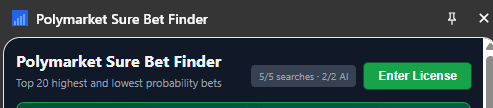
👆 Click "Enter License"
1
Copy your license key from email
Look for an email from Lemon Squeezy titled "Your Polymarket Sure Bet Finder license". Copy the key — it looks like XXXXXXXX-XXXXXXXX-XXXXXXXX-XXXXXXXX.
2
Open the side panel and click "Enter License"
Click the extension icon in your Chrome toolbar (use the 🧩 puzzle-piece menu if it's hidden) to open the side panel, then click the green Enter License button at the top — highlighted above.
3
Paste & activate
Paste your key into the box and click Activate License. AI scoring and unlimited searches unlock instantly — no restart needed.
Don't see the email after a few minutes? Check spam, then email u_niv@hotmail.com — we'll resend your key right away.